ISWIX, LLC View Christopher Painter's profile on LinkedIn profile for Christopher Painter at Stack Overflow, Q&A for professional and enthusiast programmers

Sunday, December 10, 2006

Managed Code CAN Access the MSIHANDLE

One of the ( many ) annoying things about InstallUtil is that it runs your managed code out of process where it can't access the MSIHANDLE. Once I was emailing with Bob Arnson about what would be involved to get managed code to be able to communicate with the MSI handle and he said:
You can host the CLR from native code, so theoretically, you
could start an appdomain from a type 1 CA and load and run an assembly from the
hosted appdomain. But that's only the start; you'd still have to marshal between
the two layers to give the managed code access to the
native-code MSI API. It wouldn't be a weekend job.
At the time I had not yet taken a C# class so I didn't really know what to do with this. Nearly a year has passed and I've actually managed to get enough C# reflection under my belt to think about what Bob had said. The result is a client server pattern similar to InstallUtil where the client is a Type 1 CA written in C++ and the server is a managed code class written in C#.

First let's look at the client side code:


#using <mscorlib.dll>
#using <system.dll>
#include "StdAfx.h"
using namespace System;
using namespace System::Windows::Forms;
using namespace System::Reflection;

extern "C" UINT __stdcall Test ( MSIHANDLE hMSI )
{
int _hMSI = hMSI;
array< int ^>^ args = { _hMSI };
Type^ typeCA = Assembly::LoadFile("D:\\ClassLibrary1.dll" )->GetType("ClassLibrary1.TestClass");
Object^ objectCA = System::Activator::CreateInstance(typeCA);
typeCA->InvokeMember("TestMethod",BindingFlags::InvokeMethod, Type::DefaultBinder,objectCA,args);
return ERROR_SUCCESS;
}

Basically we are using simple reflection here. We grab the MSI handle and shove it into an array. Next we load our assembly and get the type of our class. Finally we create an instance of the type and invoke our entry method passing it the argument array containing our msi handle.

Now let's look at the part of our C# code that will PInvoke to make our MSI API calls:


public class Session : System.MarshalByRefObject
{
private IntPtr
_handle;

[DllImport("msi.dll", CharSet =
CharSet.Unicode)]
static extern int MsiGetProperty(IntPtr handle, string
szName,
[Out] StringBuilder szValueBuf, ref int pchValueBuf);

[DllImport("msi.dll", CharSet = CharSet.Unicode)]
static extern int
MsiSetProperty(IntPtr handle, string szName, string szValue);

public string GetProperty(string propertyName)
{
StringBuilder
propertyValue = new StringBuilder(1024);
int size = 1024;
MsiGetProperty(
_handle, propertyName, propertyValue, ref size);
return
propertyValue.ToString();
}

public void SetProperty(string propertyName, string
propertyValue)
{
MsiSetProperty(_handle, propertyName,
propertyValue);
}

public void SetHandle( long handle )
{
_handle = new
IntPtr(handle);
}
}

Basically it's a class that wraps up MsiGetProperty() and MsiSetProperty() and exposes them as string GetProperty( string ) and void SetProperty( string, string ). Just instantiate the class, call the SetHandle() method passing it the MSI handle passed by the C++ code and your rolling. Let's see it in action:


using System;
using System.Runtime.InteropServices;
using
System.Text;
using System.Windows.Forms;

namespace
ClassLibrary1
{
public class TestClass
{
public void TestMethod(int
handle)
{
Session session = new Session();
session.SetHandle( handle
);
MessageBox.Show(session.GetProperty("ProductName"));
session.SetProperty("ProductName",
"Test");
}
}

To implement it, we merely wire the C++ code up as a Type 1 CA and store both DLL's in the binary table. The C++ could query the table and extract the record to a temp path for the reflection but I didn't need to code that since InstallShield has a built in pattern for extracting and cleaning up support files.

Speaking of InstallShield, unfortunatly the server side class would not work with CoCreateObjectDotNet(). They must be starting the CLR/AppDomain up out of process. InstallShield 12.5 maybe? Hint, hint.

Also this is obviously a prototype. I will be working on creating a complete implementation where the entire API is exposed and the client function is data driven so that it's reusable.

Thursday, December 7, 2006

MSI Tip: Authoring a Custom ICE using InstallShield 12

The December 2006 InstallShield DevLetter is out and I've contributed an article including source showing how to use InstallShield 12 to author a custom unit tests in the form of ICE's and CUB's. As I have discussed in the past, this is all possible due to the fact that InstallScript not generates `pure` Type 1 CLL CA's.

Monday, December 4, 2006

Adventures in my first WiX Aware Installer

InstallAware has released WiXAware 1.0 For Wix (Beta) today. I've downloaded and played with it a little and it seems pretty promising for a first release. There are a few things that didn't work but it's definitely worth downloading to evaluate.

Here are my first impressions.... I know it's a beta, but these are the things that I found disappointing:

Many dialogs don't have their default control or cancel control set. This is minor but it's very annoying when your trying to get a good first impression. It really shouldn't be that difficult to derive from a class that provides this functionality automatically.

The default project location is C:\Program Files\InstallAware\WiXAware\WixAware Projects. This is brand new software, it should be better then this. I haven't tried running this on Vista yet but I suspect it's going to be requiring the elevated token. While we are at it, there is no check box asking to make a directory for the project. This is typically present and helps the developer to understand where FOO is being installed ( is it WORKSPACE, WORKSPACE\FOO or WORKSPACE\FOO\FOO )

When I create a new Installation Package, I type in my company name/product name and go to pick the application icon with the browse button it sometimes throws an exception. ( File in use, it looks like a previous crashed instance of WiXAware hasn't freed up it's file lock somehow. ) Accessing the icon through the Product Information view handles the error bettter but it's still there. It would also be nice if it could look at EXE's and extract the icon resource automatically.

I created a new install, added a few assemblies and a shortcut and built it. My Product name was XXXX and CNDL1031 warned that the Directory table long name attribute was redundant and should be removed. Otherwise it worked except at run time I noted that the wizard that allowed me to rename my feature didn't left the feature Display name at the old name not the new.

Next I decided to create a custom action. It seems like the wizard dialogs are all messed up here. The first dialog is welcome the second is "Terminate this installation with an error message". Huh? I don't want to write a Type 19 CA. Then I get a CA type selection dialog that includes error terminate CAs. I select it and click next and I'm prompted for "Execute a function from a DLL file" Huh? Now I'm doing a Type 1? There is obviously a lot of work to be done here.

All in all for v1.0 beta what do I think? I like, I see a lot of promise. I had hoped to see visual studio integration since the project extension was .waproj but maybe later. This is exactly the kind of tool that WiX needs IMHO. Now just get Microsoft to buy them for alot of money, throw a lot of development resources at it and WiX and let's see where this puppy goes.

Tuesday, November 21, 2006

Using InstallShield 12 to Install .NET Framework 3.0

Microsoft recently released .Net Framework v3.0. Regardless of the fact that the next release of Visual Studio codenamed ORCAS is not yet released ( and therefore you are very unlikely to need to deploy any WinFX applications yet), one installation vendor has made a big deal of their `exclusive` support to target the new framework. They point to this as one of the reasons that makes them the `only viable alternative` to InstallShield. Well to quote a famous proverb:

"Give a man a fish and you feed him for a day; teach a man to fish and you feed him for a lifetime."

InstallShield 12 comes with a series of `Setup Prerequisites`. In a nutshell, these are XML project files that describe the contents, conditions, execution and other attributes of a redistributable package that you need your setup.exe bootstrapper to install prior to running your main MSI installation package. Additionally there is a Setup Prerequisite Editor that allows developers to fully define their own prerequisites.

So let's walk through creating our own Setup Prerequisite:

Download the full redistributable from Microsoft. While it's downloading review this whitepaper that tells you everything you need to know to implement the setup prerequisite.

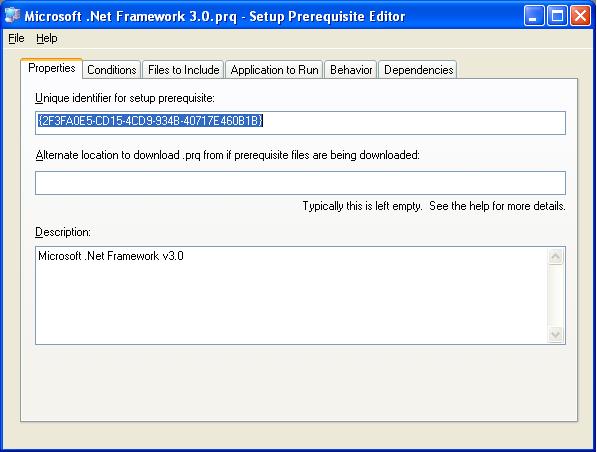
Open up your InstallShield project and select Tools Prerequisite editor. First do a File Save As. Next we'll start with the properties tab. Add in a description:


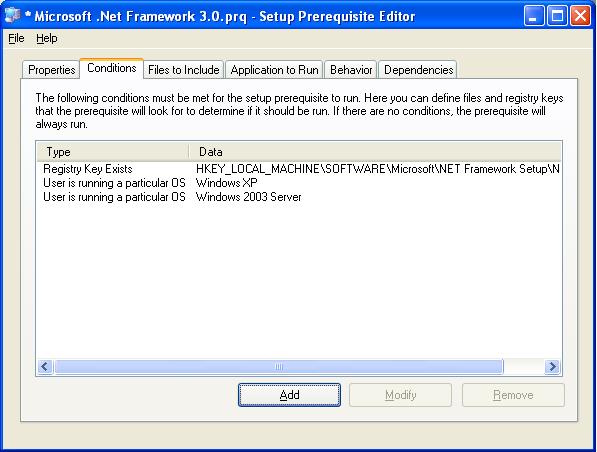
Next click on the conditions tab and add our conditions. Were going to tell it to install when a certain registry key is missing and the OS is XP or 2003.


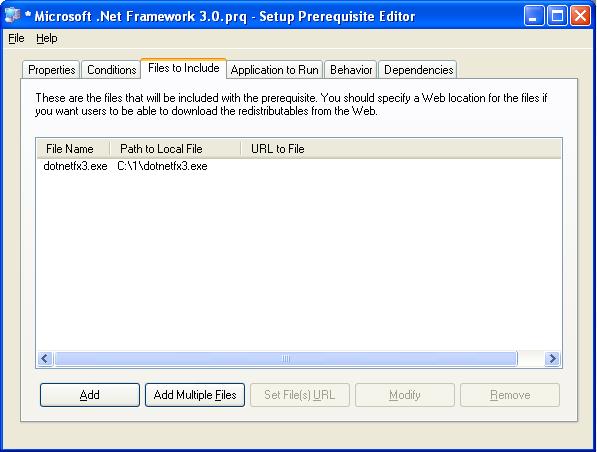
Now let's add the file we downloaded from Microsoft.

Now we teach InstallShield how to install the package silently and check to see if a reboot is needed.

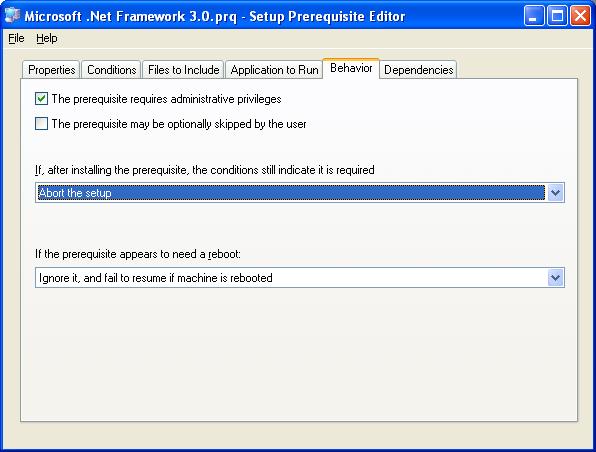
Finally, let's set some attributes that complete describing the installation story to InstallShield.


Next we save the prereq and add it to our Project.


Now it's time to build and deploy to a test machine that doesn't have .Net 3.0.


That's all there is to it. When you run your setup.exe the redist is installed and then your MSI package is installed. When you run setup.exe again it skips installing .Net and goes to servicing your install.

Monday, November 20, 2006

WiX Heat Website Problems

Some developers love to hate InstallShield. I've met a few who felt strongly on this topic. Let me be blunt: Frankly they didn't have a technical bone to stand on. They just seemed to fixate on a couple minor little annoyances or otherwise make a big deal out of a non-issue because of their lack of understanding of the underlying technology. One thing that was always in common was a `my grass is greener` attitude when they would reccomend some other tool or worse try to invent one themselves.

Eitherway, I try to keep my options and opinions as open as possible so occasionally I'll evaluate other tools. Recently I look at WiX to see how it's going.

Derek Cicerone once wrote in his blog:

"Heat has the capability, today, to capture IIS web sites. Simply run 'heat.exe
website "My WebSite Name" -out sourceFile.wxs' to harvest a web site and all its
files. You can then compile and link with the WixIIsExtension to create an
entire web site setup in minutes! "


Wow, such glowing optimistic comments. Ok, so let's give it a try: ( Website name changed to product the innocent )

C:\data> heat website MyWebSite -out sourceFile.wxs

Microsoft (R) Windows Installer XML Toolset Harvester version
3.0.2211.0Copyright (C) Microsoft Corporation 2006. All rights
reserved.
heat.exe : error HEAT0001 : Exception from HRESULT:
0x80005006.
Exception Type:
System.Runtime.InteropServices.COMException
Stack Trace: at
System.DirectoryServices.Interop.IAds.GetEx(String bstrName) at
System.DirectoryServices.PropertyValueCollection.PopulateList() at
System.DirectoryServices.PropertyValueCollection..ctor(DirectoryEntry entry,
String propertyName) at
System.DirectoryServices.PropertyCollection.get_Item(String
propertyName) at
Microsoft.Tools.WindowsInstallerXml.Extensions.IIsWebSiteHarvester.HarvestWebSite(DirectoryEntry
webSiteEntry) at
Microsoft.Tools.WindowsInstallerXml.Extensions.IIsWebSiteHarvester.HarvestWebSite(String
name) at
Microsoft.Tools.WindowsInstallerXml.Extensions.IIsWebSiteHarvester.Harvest(String
argument) at
Microsoft.Tools.WindowsInstallerXml.Harvester.Harvest(String
argument) at
Microsoft.Tools.WindowsInstallerXml.Tools.Heat.Run(String[] args)

Hmmmm, ok maybe I'm passing the website name wrong. Lets's see what it does with a site that I know doesn't exist:


C:\data> heat website foo -out sourceFile.wxs

Microsoft (R) Windows Installer XML Toolset Harvester version
3.0.2211.0Copyright (C) Microsoft Corporation 2006. All rights
reserved.
heat.exe : error HEAT5158 : The web site 'foo' could not be
found. Please check that the web site exists, and that it is spelled
correctly (please note, you must use the correct case).

Ok, that's different. So obviously the first time it did find my website. So what happens if you don't pass a web site name? Let's see......

Microsoft (R) Windows Installer XML Toolset Harvester version
3.0.2211.0Copyright (C) Microsoft Corporation 2006. All rights
reserved.
heat.exe : error HEAT0001 : Value cannot be null.Parameter name:
argument
Exception Type: System.ArgumentNullException
Stack
Trace: at
Microsoft.Tools.WindowsInstallerXml.Harvester.Harvest(String
argument) at
Microsoft.Tools.WindowsInstallerXml.Tools.Heat.Run(String[] args)

Wow, that's pretty. Don't even bother trying to catch the error and give the user something useful to work with. Just throw an exception and blog chunks. And the InstallShield haters say the quality of InstallShield is bad.

Friday, November 10, 2006

InstallScript CA Performance Issue Revisited

In a previous post I wrote about the run time initialization cost associated with the new InstallScript 12 design. There was also a thread over at InstallShield Community discussing exceptional slowness ( and occasional termination )on Windows Vista. This has been resolved with a hotfix as documented in this KB article. I strongly encourage all InstallShield 12 users to download the hotfix and rebuild their setups against the newer embedded engine in order to prevent problems down the roads when your setup packages are eventually used by customers running Windows Vista. Fortunatly for InstallScript developers it's this easy. C++ developers will have to rebuilt their CA's with the /NXCOMPAT setting.

As an aside, InstallShield goes on to say the problem manifested itself when Data Execution Protection is enabled on a dual-core processor on Vista. At about the same time a new post also appeared on the Windows Installer Team Blog. It seems the root cause of this problem actually stemmed from security changes in Windows Vista.

A future KB article is summarized as:

KB Title:

Custom Action code that is not NX compliant will not run on
Windows Vista.


Summary:

Software developers should be aware that starting
with Vista, msiexec.exe is NXCOMPAT. (i.e., it is compiled with the /NXCOMPAT
switch.) This ensures that non-executable code is not run by msiexec.exe.
Msiexec.exe is the image for Windows Installer service, a Windows Installer
client and any custom action sand-box processes. What this means is that any
custom code that is not NX compliant would not be run and would result in a
forceful shutdown by the Vista NX sub-system.


More Information:

If your Windows Installer (MSI) package use libraries that are not NX compatible, then they might not work on your Vista systems. It is recommended that you recompile your setups using the new NX compatible libraries. Older versions of ATL
(pre-Visual C++ 8.0) are known to be not NX-Compatible. Using ATL shipped with
Visual C++ 8.0 is NX compliant.

Thursday, November 9, 2006

Happy 231st Birthday Marines!

Man I feel old today! It seems like just yesterday at was my 217th birthday. To all you devil dogs out there ( past, present and future ), I salute you.

(1) On November 10, 1775, a Corps of Marines was created by a resolution of Continental Congress. Since that date many thousand men have borne the name "Marine". In memory of them it is fitting that we who are Marines should commemorate the birthday of our corps by calling to mind the glories of its long and illustrious history.
(2) The record of our corps is one which will bear comparison with that of the most famous military organizations in the world's history. During 90 of the 146 years of its existence the Marine Corps has been in action against the Nation's foes. From the Battle of Trenton to the Argonne, Marines have won foremost honors in war, and is the long eras of tranquility at home, generation after generation of Marines have grown gray in war in both hemispheres and in every corner of the seven seas, that our country and its citizens might enjoy peace and security.
(3) In every battle and skirmish since the birth of our corps, Marines have acquitted themselves with the greatest distinction, winning new honors on each occasion until the term "Marine" has come to signify all that is highest in military efficiency and soldierly virtue.
(4) This high name of distinction and soldierly repute we who are Marines today have received from those who preceded us in the corps. With it we have also received from them the eternal spirit which has animated our corps from generation to generation and has been the distinguishing mark of the Marines in every age. So long as that spirit continues to flourish Marines will be found equal to every emergency in the future as they have been in the past, and the men of our Nation will regard us as worthy successors to the long line of illustrious men who have served as "Soldiers of the Sea" since the founding of the Corps.

John A. Lejeune,Major General Commandant