ISWIX, LLC View Christopher Painter's profile on LinkedIn profile for Christopher Painter at Stack Overflow, Q&A for professional and enthusiast programmers

Tuesday, November 21, 2006

Using InstallShield 12 to Install .NET Framework 3.0

Microsoft recently released .Net Framework v3.0. Regardless of the fact that the next release of Visual Studio codenamed ORCAS is not yet released ( and therefore you are very unlikely to need to deploy any WinFX applications yet), one installation vendor has made a big deal of their `exclusive` support to target the new framework. They point to this as one of the reasons that makes them the `only viable alternative` to InstallShield. Well to quote a famous proverb:

"Give a man a fish and you feed him for a day; teach a man to fish and you feed him for a lifetime."

InstallShield 12 comes with a series of `Setup Prerequisites`. In a nutshell, these are XML project files that describe the contents, conditions, execution and other attributes of a redistributable package that you need your setup.exe bootstrapper to install prior to running your main MSI installation package. Additionally there is a Setup Prerequisite Editor that allows developers to fully define their own prerequisites.

So let's walk through creating our own Setup Prerequisite:

Download the full redistributable from Microsoft. While it's downloading review this whitepaper that tells you everything you need to know to implement the setup prerequisite.

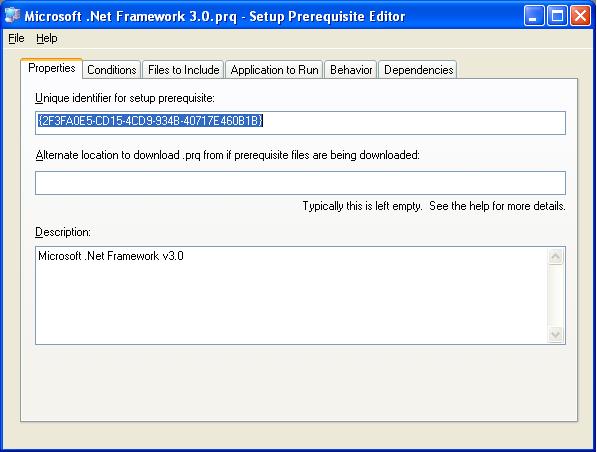
Open up your InstallShield project and select Tools Prerequisite editor. First do a File Save As. Next we'll start with the properties tab. Add in a description:

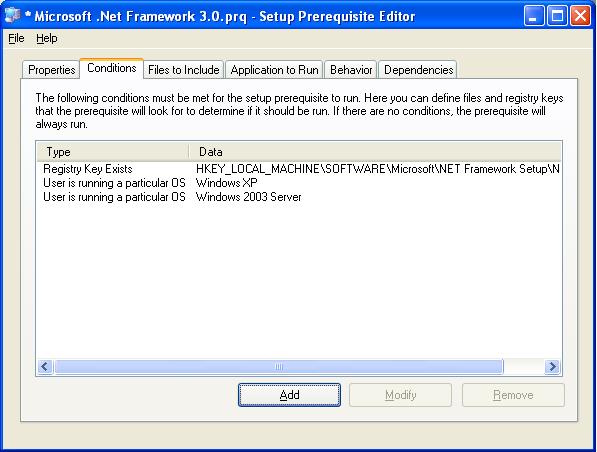
Next click on the conditions tab and add our conditions. Were going to tell it to install when a certain registry key is missing and the OS is XP or 2003.

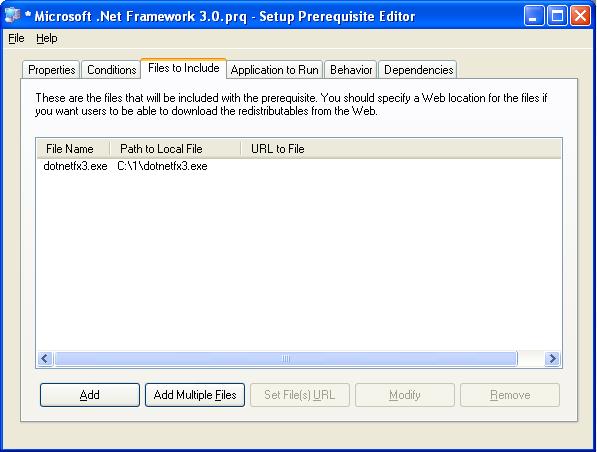
Now let's add the file we downloaded from Microsoft.
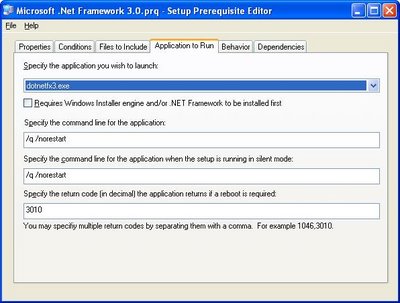
Now we teach InstallShield how to install the package silently and check to see if a reboot is needed.
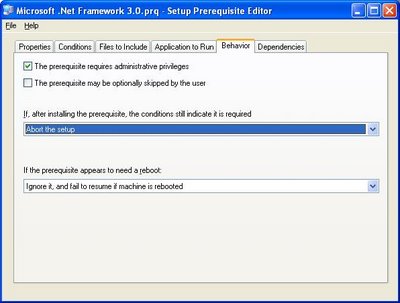
Finally, let's set some attributes that complete describing the installation story to InstallShield.
Next we save the prereq and add it to our Project.


Now it's time to build and deploy to a test machine that doesn't have .Net 3.0.


That's all there is to it. When you run your setup.exe the redist is installed and then your MSI package is installed. When you run setup.exe again it skips installing .Net and goes to servicing your install.

Monday, November 20, 2006

WiX Heat Website Problems

Some developers love to hate InstallShield. I've met a few who felt strongly on this topic. Let me be blunt: Frankly they didn't have a technical bone to stand on. They just seemed to fixate on a couple minor little annoyances or otherwise make a big deal out of a non-issue because of their lack of understanding of the underlying technology. One thing that was always in common was a `my grass is greener` attitude when they would reccomend some other tool or worse try to invent one themselves.

Eitherway, I try to keep my options and opinions as open as possible so occasionally I'll evaluate other tools. Recently I look at WiX to see how it's going.

Derek Cicerone once wrote in his blog:

"Heat has the capability, today, to capture IIS web sites. Simply run 'heat.exe
website "My WebSite Name" -out sourceFile.wxs' to harvest a web site and all its
files. You can then compile and link with the WixIIsExtension to create an
entire web site setup in minutes! "


Wow, such glowing optimistic comments. Ok, so let's give it a try: ( Website name changed to product the innocent )

C:\data> heat website MyWebSite -out sourceFile.wxs

Microsoft (R) Windows Installer XML Toolset Harvester version
3.0.2211.0Copyright (C) Microsoft Corporation 2006. All rights
reserved.
heat.exe : error HEAT0001 : Exception from HRESULT:
0x80005006.
Exception Type:
System.Runtime.InteropServices.COMException
Stack Trace: at
System.DirectoryServices.Interop.IAds.GetEx(String bstrName) at
System.DirectoryServices.PropertyValueCollection.PopulateList() at
System.DirectoryServices.PropertyValueCollection..ctor(DirectoryEntry entry,
String propertyName) at
System.DirectoryServices.PropertyCollection.get_Item(String
propertyName) at
Microsoft.Tools.WindowsInstallerXml.Extensions.IIsWebSiteHarvester.HarvestWebSite(DirectoryEntry
webSiteEntry) at
Microsoft.Tools.WindowsInstallerXml.Extensions.IIsWebSiteHarvester.HarvestWebSite(String
name) at
Microsoft.Tools.WindowsInstallerXml.Extensions.IIsWebSiteHarvester.Harvest(String
argument) at
Microsoft.Tools.WindowsInstallerXml.Harvester.Harvest(String
argument) at
Microsoft.Tools.WindowsInstallerXml.Tools.Heat.Run(String[] args)

Hmmmm, ok maybe I'm passing the website name wrong. Lets's see what it does with a site that I know doesn't exist:


C:\data> heat website foo -out sourceFile.wxs

Microsoft (R) Windows Installer XML Toolset Harvester version
3.0.2211.0Copyright (C) Microsoft Corporation 2006. All rights
reserved.
heat.exe : error HEAT5158 : The web site 'foo' could not be
found. Please check that the web site exists, and that it is spelled
correctly (please note, you must use the correct case).

Ok, that's different. So obviously the first time it did find my website. So what happens if you don't pass a web site name? Let's see......

Microsoft (R) Windows Installer XML Toolset Harvester version
3.0.2211.0Copyright (C) Microsoft Corporation 2006. All rights
reserved.
heat.exe : error HEAT0001 : Value cannot be null.Parameter name:
argument
Exception Type: System.ArgumentNullException
Stack
Trace: at
Microsoft.Tools.WindowsInstallerXml.Harvester.Harvest(String
argument) at
Microsoft.Tools.WindowsInstallerXml.Tools.Heat.Run(String[] args)

Wow, that's pretty. Don't even bother trying to catch the error and give the user something useful to work with. Just throw an exception and blog chunks. And the InstallShield haters say the quality of InstallShield is bad.

Friday, November 10, 2006

InstallScript CA Performance Issue Revisited

In a previous post I wrote about the run time initialization cost associated with the new InstallScript 12 design. There was also a thread over at InstallShield Community discussing exceptional slowness ( and occasional termination )on Windows Vista. This has been resolved with a hotfix as documented in this KB article. I strongly encourage all InstallShield 12 users to download the hotfix and rebuild their setups against the newer embedded engine in order to prevent problems down the roads when your setup packages are eventually used by customers running Windows Vista. Fortunatly for InstallScript developers it's this easy. C++ developers will have to rebuilt their CA's with the /NXCOMPAT setting.

As an aside, InstallShield goes on to say the problem manifested itself when Data Execution Protection is enabled on a dual-core processor on Vista. At about the same time a new post also appeared on the Windows Installer Team Blog. It seems the root cause of this problem actually stemmed from security changes in Windows Vista.

A future KB article is summarized as:

KB Title:

Custom Action code that is not NX compliant will not run on
Windows Vista.


Summary:

Software developers should be aware that starting
with Vista, msiexec.exe is NXCOMPAT. (i.e., it is compiled with the /NXCOMPAT
switch.) This ensures that non-executable code is not run by msiexec.exe.
Msiexec.exe is the image for Windows Installer service, a Windows Installer
client and any custom action sand-box processes. What this means is that any
custom code that is not NX compliant would not be run and would result in a
forceful shutdown by the Vista NX sub-system.


More Information:

If your Windows Installer (MSI) package use libraries that are not NX compatible, then they might not work on your Vista systems. It is recommended that you recompile your setups using the new NX compatible libraries. Older versions of ATL
(pre-Visual C++ 8.0) are known to be not NX-Compatible. Using ATL shipped with
Visual C++ 8.0 is NX compliant.

Thursday, November 9, 2006

Happy 231st Birthday Marines!

Man I feel old today! It seems like just yesterday at was my 217th birthday. To all you devil dogs out there ( past, present and future ), I salute you.

(1) On November 10, 1775, a Corps of Marines was created by a resolution of Continental Congress. Since that date many thousand men have borne the name "Marine". In memory of them it is fitting that we who are Marines should commemorate the birthday of our corps by calling to mind the glories of its long and illustrious history.
(2) The record of our corps is one which will bear comparison with that of the most famous military organizations in the world's history. During 90 of the 146 years of its existence the Marine Corps has been in action against the Nation's foes. From the Battle of Trenton to the Argonne, Marines have won foremost honors in war, and is the long eras of tranquility at home, generation after generation of Marines have grown gray in war in both hemispheres and in every corner of the seven seas, that our country and its citizens might enjoy peace and security.
(3) In every battle and skirmish since the birth of our corps, Marines have acquitted themselves with the greatest distinction, winning new honors on each occasion until the term "Marine" has come to signify all that is highest in military efficiency and soldierly virtue.
(4) This high name of distinction and soldierly repute we who are Marines today have received from those who preceded us in the corps. With it we have also received from them the eternal spirit which has animated our corps from generation to generation and has been the distinguishing mark of the Marines in every age. So long as that spirit continues to flourish Marines will be found equal to every emergency in the future as they have been in the past, and the men of our Nation will regard us as worthy successors to the long line of illustrious men who have served as "Soldiers of the Sea" since the founding of the Corps.

John A. Lejeune,Major General Commandant

Thursday, October 26, 2006

Multiple Instance MSI's and InstallShield 12

Edit:

This article was years ahead of it's time. InstallShield 2009 will natively support this pattern as described here.

At a previous job, they wanted the ability to install multiple instances of their product but I never gave it a whole lot of attention because the application wasn't really isolated in such a way to really support the requirement in the first place. I've since moved on and the requirement has resurfaced. Fortunately this time I couldn't really see any reason why they couldn't run multiple isolated instances so I started wondering what would be involved. Fortunately Stefan Krueger was kind enough to point me to a topic in the MSI SDK that had escaped my attention. `Authoring Multiple Instances with Instance Transforms`.

The concept is you create ProductCode changing transforms and then embed them into the _Storages table of your MSI. At install time invoking will simply install your default instance. However if you add the property MSINEWINSTANCE=1 and specify your embedded transform with TRANSFORMS=:Embedded.mst then suddenly your install takes on a new identity and it can be installed side by side with your default instance. There is a bit more too it then that to make sure everything is isolated correctly so jump into the SDK and have some fun.

I had also been stuck on DevStudio 9 for awhile and low and behold InstallShield 12 has a partial implementation of this pattern. You simply add the property InstanceId and default it to 0. Then in the direct editor you populate data in the ISProductConfigurationInstance table. A simple record like:

ISProductConfiguration_1 1 ProductCode {A5F2A675-9BAB-4A36-BE7A-C4E412230404}

This tells the build process to automatically generate InstanceId1.mst when building ISProdutConfiguation_1 and to author a ProductCode property change then embed it into _Storages when complete.

Cool! But wait..... they didn't finish! You don't REALLY want a user to have to know how to invoke the instance do you? That's what those pretty little bootstrappers are for. So I started digging in and I wrote a utility that:

1) Opens the MSI in read/only mode, grabs the ProductCode out of the Property table and then iterates through the _Storages table and applies each transform to retrieve the additional ProductCode definitions.

2) Get the PackageCode of the MSI.

3) Invoke the MSI API to find out information of installed instances. Which ProductCodes are installed, what are the ProductNames and InstallLocations as well as which PackageCode installed each product.

4) If no products are installed, then proceed to installing the default instance. If products are detected then show a dialog asking the user if he'd like to install a new instance ( if any more are available ) or service an existing instance.

5) Launch the MSI with the correct options to handle a new instance, maintenance of an existing instance or upgrading of an existing install ( REINSTALL=ALL REINSTALLMODE=vomus ).

Ok were cooking with gas but wait! What about patching?

Well it seems that again InstallShield isn't quite there. The patch generation process only populates the default instances ProductCode into the patch's SummaryInformationStream Targets attribute. Tis means the patch only detects the default instance as a valid product to be upgraded. This can be fixed by again iterating through _Storages to get the ProductCodes and populating the Targets in a ; delimited manner.

Except of course now will need a better update.exe because we really don't want to have to use the /n switch to specify the ProductCode of the instance to be patched. So now we create a bootstrapper that

1) Opens the patch and grab the Targets property.
2) Call the MSI API to see what matching products are installed
3) Throw a dialog asking the user which instance he would like upgraded.
4) Call the patch.

If you do this all correctly you end up with a fairly scalable servicing mechanism for supporting multiple instance of your product. Now that's Hard Core Setup Engineering.

Monday, October 23, 2006

99 Bottles of Beer On The Wall

A few months back a former coworker of mine introduced me to a web site called 99 Bottles of Beer. The premise of the site is simple: One Program in 1023 variations. I couldn't help notice that Windows Installer was missing. I wanted to implement an MSI version but there was one catch: MSI doesn't really have any arithmetic operators and I didn't want to be cheesy and call out to a custom action since that really wouldn't be pure MSI.

Fortunatly Kalle Olavi Niemitalo pointed out to me that you could fake it using single digit string properties like this:

Property Table
Dec9=8
Dec8=7 ( and so on )

ControlEvents
[NextTemp] Dec[NextIndexOne]
[NextIndexOne] [[NextTemp]]

If you start off with NextIndexOne = "9" then NextTemp is assigned Dec9 which in turn assigns 8 to NextIndexOne. A fake decrement operator. You can do the same thing for the tens position when a rollover of the ones occurs and add some additional logic for when you get to 0.

It's kinda silly but fun and hey, Windows Installer just HAD to be represented!

Thursday, October 12, 2006

Vista Deferred CA consideration

I don't believe I've seen this mentioned elsewhere so listen up friends!

In the microsoft.public.platformsdk.msi newsgroup, Antti Nivala recently posted a thread talking about a problem running an EXE Type 3074 custom action on Vista. Antti figured out that the CA was failing because it wasn't being granted the SeBackupPrivilege and that a call to AdjustTokenPrivileges would not yield the expected power that was previously available on Windows XP.

The part that caught my eye though was Antti said this was happening even with UAC turned off. Now HOW could that be?

The answer was revealed to me in this Microsoft Document. It seems that on Vista a service can be configured to run as LocalSystem and yet also be configured to run with a reduced subset of rights. A quick peek at the registry showed that MsiServer is configured with the following rights:

SeTcbPrivilege
SeCreatePagefilePrivilege
SeLockMemoryPrivilege
SeIncreaseBasePriorityPrivilege
SeCreatePermanentPrivilege
SeAuditPrivilegeSeSecurityPrivilege
SeChangeNotifyPrivilege
SeProfileSingleProcessPrivilege
SeImpersonatePrivilege
SeCreateGlobalPrivilege
SeAssignPrimaryTokenPrivilege
SeRestorePrivilege
SeIncreaseQuotaPrivilege
SeShutdownPrivilege
SeTakeOwnershipPrivilege
SeLoadDriverPrivilege

I'm suspecting that this is a defect in the MSI 4.0 in Vista.